
Logitech CollabOS Integration Guide
This document serves as a comprehensive guide that outlines the steps required to integrate Logitech devices with the NetSpeek platform via the CollabOS API.
Note
There are two paths for integrating Logitech devices with NetSpeek – the CollabOS API available at a device’s local IP address, and the Logi Sync API available through Logitech’s cloud offering documented here. Some organizations may want to use one method or the other, while some may want to orchestrate Logitech devices in their environment with both methods in parallel. Contact your NetSpeek representative to discuss this decision in more detail.
Prerequisites
Before beginning the integration, confirm the following:
- Your Logitech CollabOS devices are powered on and connected to the same network as your NetSpeek Edge.
- You have deployed a NetSpeek Edge client as described here: https://docs.netspeek.ai/netspeek-edge-installation-guide/
- Note: This integration requires an Edge running software version
Beta6or later.
- Note: This integration requires an Edge running software version
Step 1. Add Device to NetSpeek Room Canvas
Device Provisioning Flow
- In the NetSpeek Console, navigate to Room Management
- Select the room you wish to add your Logitech Device to
- Click Launch Room Canvas
- Click Add device to room
- Choose your desired device from the manufacturer → device model list.
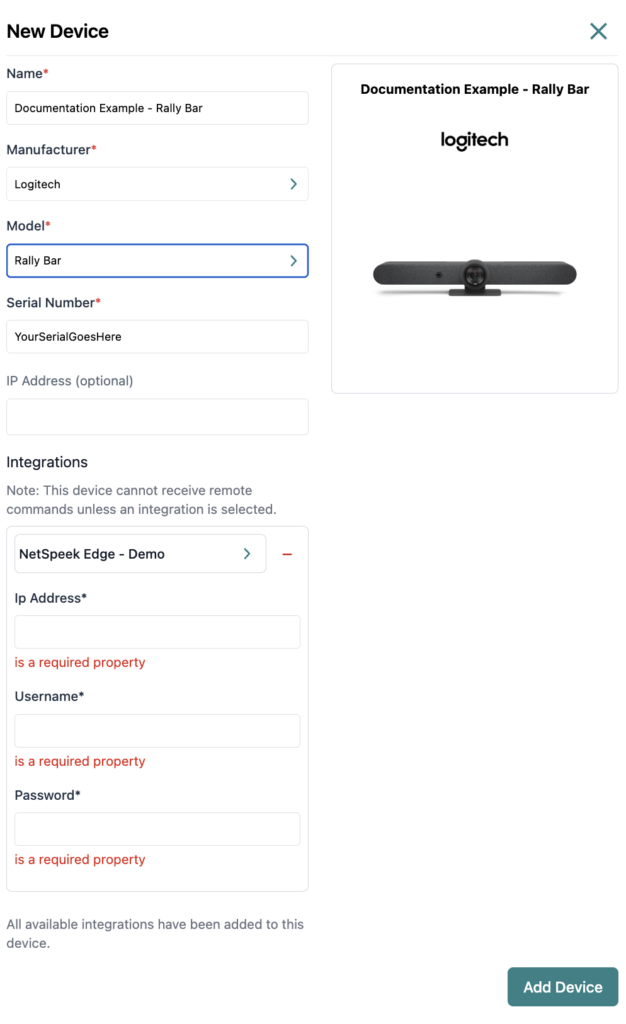
- Configure the appropriate values, and in the “Integrations” section, select a previously created NetSpeek Edge VM integration. Ensure that the Edge VM is on a network that can reach the device’s configured IP address.
- In the configuration panel, enter the following fields:
- Device IP Address (static/reserved IP, or DHCP)
- Username and password to manage the device
Verification
Once the relevant settings described above are configured, to validate the integration:
- Select a Logitech device in the NetSpeek console, open the Device Actions Tab, and select an available device action. It is generally advisable to test by dispatching a non-intrusive command such as a
Get Status. - On the device, observe the selected action occurring.
Troubleshooting
Connection Issues
- Confirm the IP address is correct and accessible from the NetSpeek network.
- Ensure the port used is not blocked by firewall rules on the machine running your NetSpeek Edge.
Support
If you run into any issues during onboarding or have questions, contact NetSpeek Support at support@netspeek.com.