
Shure Intellimix Compute Integration Guide
This document serves as a comprehensive guide that outlines the steps required to integrate Shure Intellimix-Compute devices with the NetSpeek platform.
Note that some Shure devices (such as microphone systems and DSPs) integrate with NetSpeek via a Shure component called the System API Server. This guide is specifically focused on the Intellimix Compute device – for other devices from Shure, see Shure System API Server Integration Guide.
Prerequisites
Before beginning the integration, confirm the following:
- Your Shure Intellimix Compute system is powered on and connected to a network that is routable to/from your NetSpeek Edge.
- You have deployed a NetSpeek Edge VM as described here: https://docs.netspeek.ai/netspeek-edge-installation-guide/
- You have access to the Shure Web Application or Control Software.
- You know the device IP address, port, shared key, and passphrase.
- The shared key is an API key which is generated by Shure’s software when System API runs for the first time. This key is found at C:\ProgramData\Shure\SystemAPI\Standalone\Security\sharedkey.txt on the device when accessing via Remote Desktop Protocol or other methods.
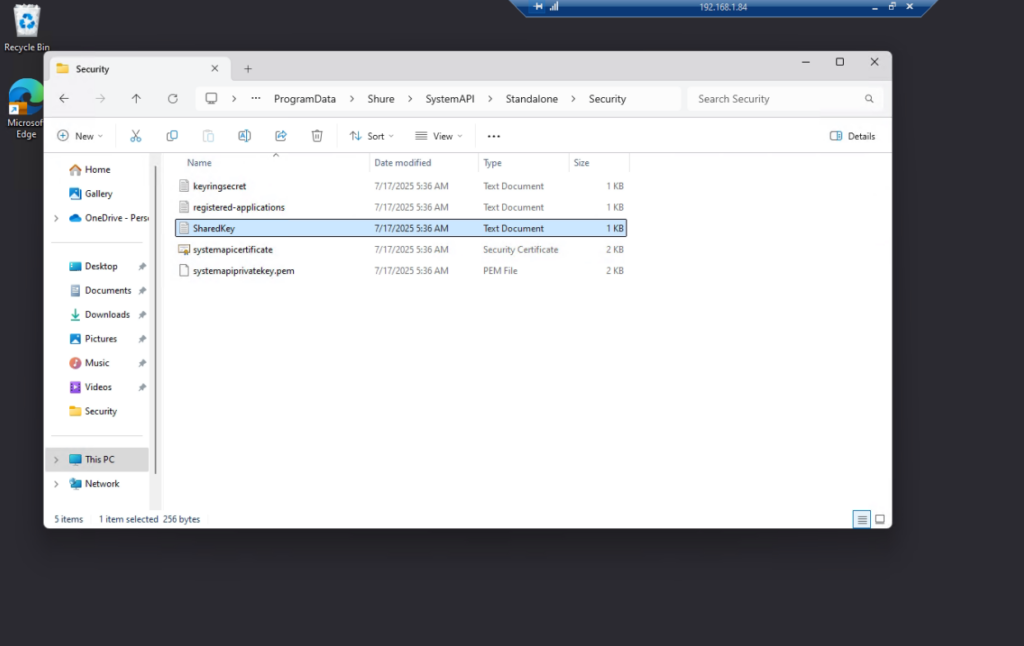
- The device IP address, port and passphrase are all configured in the initial setup of the Shure System API Server – you may need to contact your administrator if this information is not known.
Add Device to NetSpeek Room Canvas
Device Provisioning Flow
- In the NetSpeek Console, navigate to Room Management
- Select the room you wish to add your Shure device to
- Click Launch Room Canvas
- Click Add device to room
- Choose your desired device from the manufacturer → device model list.
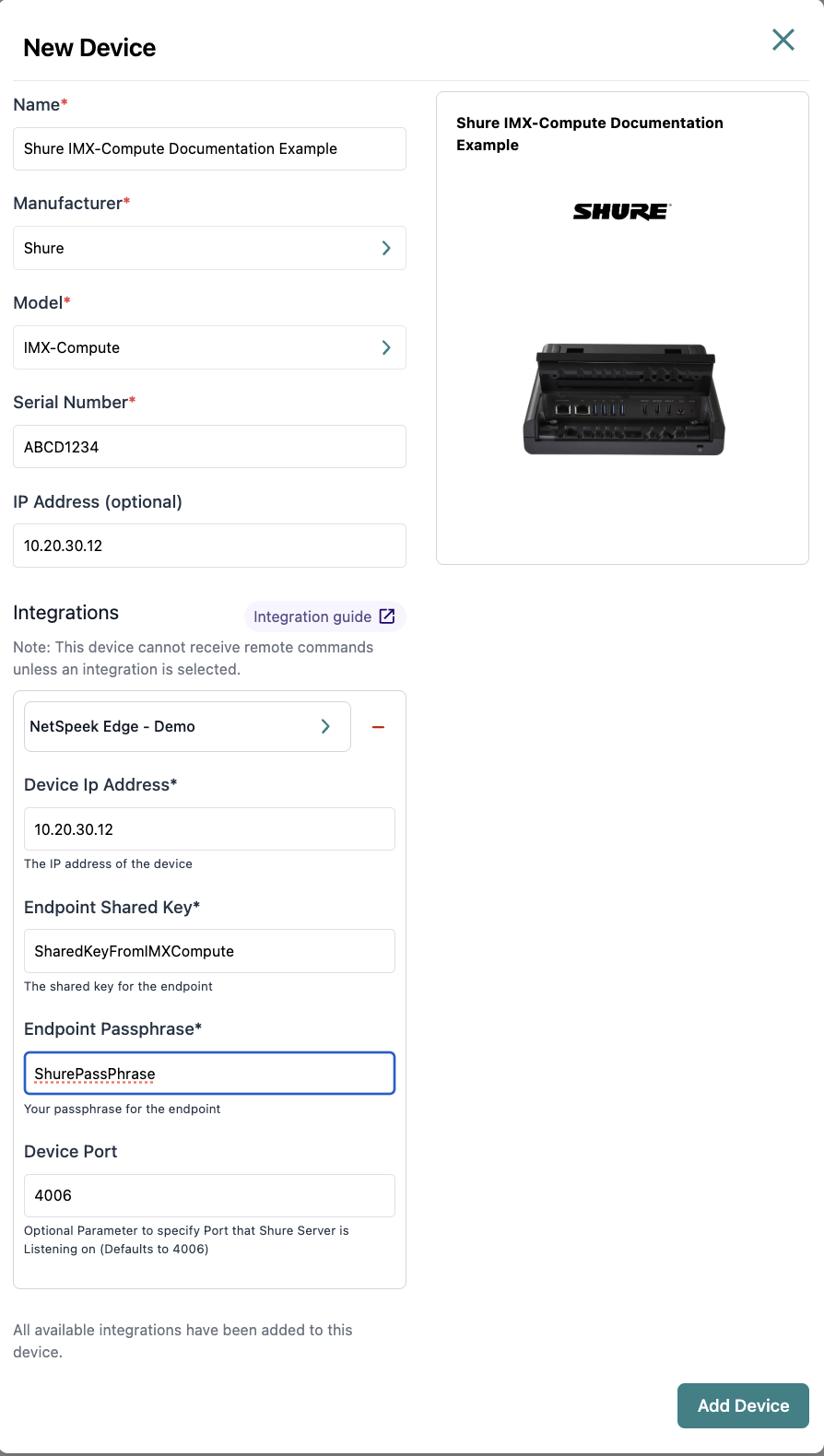
- Configure the appropriate values, and in the “Integrations” section, select a previously created NetSpeek Edge VM integration. Ensure that the Edge VM is on a network that can reach the device’s configured IP address.
- In the configuration panel, enter the following fields:
- Device IP Address (static/reserved IP configured on the Shure IntelliMix-Compute device during its setup)
- Shared Key
- Passphrase
- Port (Shared Key, Passphrase, and Port are all as configured in the Shure device’s settings)
Verification
Once the relevant settings described above are configured, to validate the integration:
- Select a Shure IMX Compute device in the NetSpeek console, open the Device Actions Tab, and select an available device action. It is generally advisable to test by dispatching a non-intrusive command such as a
Get Status. - On the device, observe the selected action occurring.
Troubleshooting
Connection Issues
- Confirm the IP address is correct and routable from the network segment where the NetSpeek Edge VM is deployed.
- Ensure the port used is not blocked by firewall rules on the machine running your NetSpeek Edge VM.
- Confirm that the Shared Key and Passphrase match exactly between Shure and NetSpeek.
- Confirm that the port configured in NetSpeek Room Canvas is the same port the IMX Compute is listening on.
Resetting Device
- If pairing fails repeatedly, try to restart the Shure device.
- As a last resort, reset the device to factory defaults and repeat the setup process.
Support
If you run into any issues during onboarding or have questions, contact NetSpeek Support at support@netspeek.com.