
NetSpeek 1.9 July 2026 Release Notes
NetSpeek Platform 1.9 Update – July 31, 2026
This release focuses on three feature areas: context-aware device control to avoid disruptions, a substantially reworked Room Canvas experience, and tenant-aware permissions throughout the admin portal. It also closes a batch of security findings across the API, the Edge VM, and Lena.
Please read first: changes which may affect existing deployments
Device integrations
- Neat devices are now identified by serial number rather than their Neat Pulse device ID, for ease of use and reliability reasons. Make sure your Neat endpoints have their accurate serial number as part of their configuration.
- Neat devices without a configured serial number will continue to use their Neat Pulse device ID as the fallback – though please note that NetSpeek intends to deprecate the ability for users to configure Pulse device IDs in Q4 2026, at which point serial number will be the only permitted method of configuration.
- Zoom integrations with incomplete permissions will now report as healthy with a warning instead of failing when configured at the tenant level – missing scopes are itemized so they can be corrected on the Zoom account side. Individual actions that require a missing permission will surface the error when run at the device level.
- LG devices are integrated using a different mechanism, requiring different network ports (now using TCP 9761, no longer using TCP 3000/3001) and providing compatibility with security-related changes made by LG. Edge VM version
1.3.2is now required for supported orchestration of LG devices – more details are available in the LG webOS Integration Guide.
Room Canvas
- A physical port can now hold more than one connection. The Canvas UI previously blocked a second connection on an occupied port.
Image Upload Changes
- Avatar upload has been removed from the Edit User form. Users set their own avatar from their profile; tenant logos are still configured in tenant settings.
New features
Lena provides context before taking actions that could disrupt a meeting
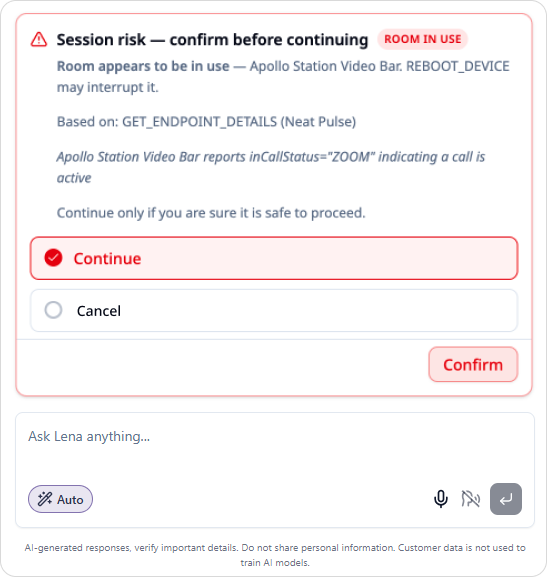
Lena will now check the status of devices in the room before initiating potentially disruptive actions, such as:
- Reboot
- Update firmware
- Switch input
- Power off
- Mute
- End meeting
Lena probes the target device, its connections, and other devices in the room, via both Edge VM and cloud connections, to determine whether a meeting/call is active, or the room is physically occupied.
If the room is occupied or a meeting is active, or if occupancy cannot be determined, Lena asks the user to confirm the risk of disruption is understood before taking action. Rooms that are clearly idle are handled as before, without the extra prompt.
Room Canvas: port appearances, click-to-connect, and better routing
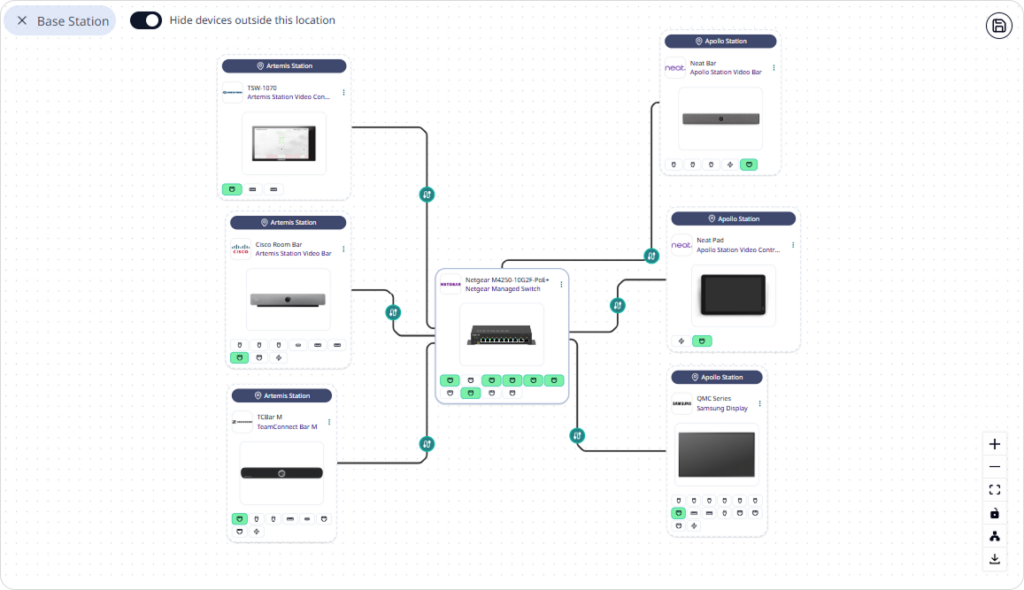
The Room Canvas interface underwent the most visible and extensive UI changes in this release.
- Port appearances. Devices with many ports now have an interactive collapsible port grid. Collapsed port grids remain connectable, so you can drag a cable to the device card and pick the port afterward.
- Click-to-connect. Connecting two ports no longer requires dragging a virtual cable between them. Click a source port, then click a destination port; a preview follows the cursor between the two. Drag-to-connect still works exactly as before.
- Improved cable routing visualization. Cables are routed with a new engine that produces cleaner orthogonal paths, separates overlapping runs instead of stacking them, and keeps mid-cable labels legible when several converge.
- Layout controls. A new arrange menu offers top-to-bottom, left-to-right, and grid layouts.
- Multiple connections per port. See the note above.
- Devices outside the room now fade rather than disappear when you toggle them off, so you keep spatial context.
- Port hover highlights every cable on that port and dims the rest of the canvas. Clicking a port with several cables opens the device panel on its Connections tab.
Resizable console columns
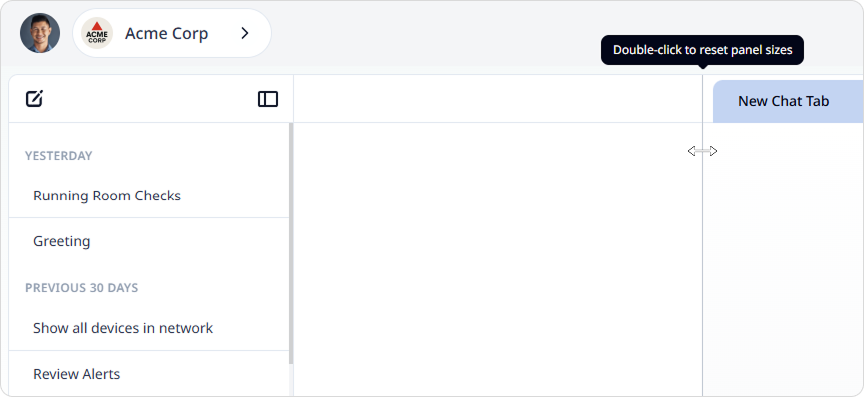
Chat history, the active Lena conversation, and the console are now a three-column resizable group – you can drag the dividers to size them, and your layout is remembered between visits. The sliding side panel used across the Room Canvas, device list, and events view is resizable on the same basis, with per-surface widths remembered independently. Double-click a divider to reset it to its default position.
Tenant-aware permissions
Tenant management now reads your specific permissions for the tenant you have selected, rather than inferring them from your sign-in context. Navigation, workspace sections, and individual actions are gated on these tenant-level permissions.
Permissions default to denied until they have loaded, so controls stay disabled until access is positively granted, and one tenant’s grants do not apply when switching to another.
Integrations panel improvements
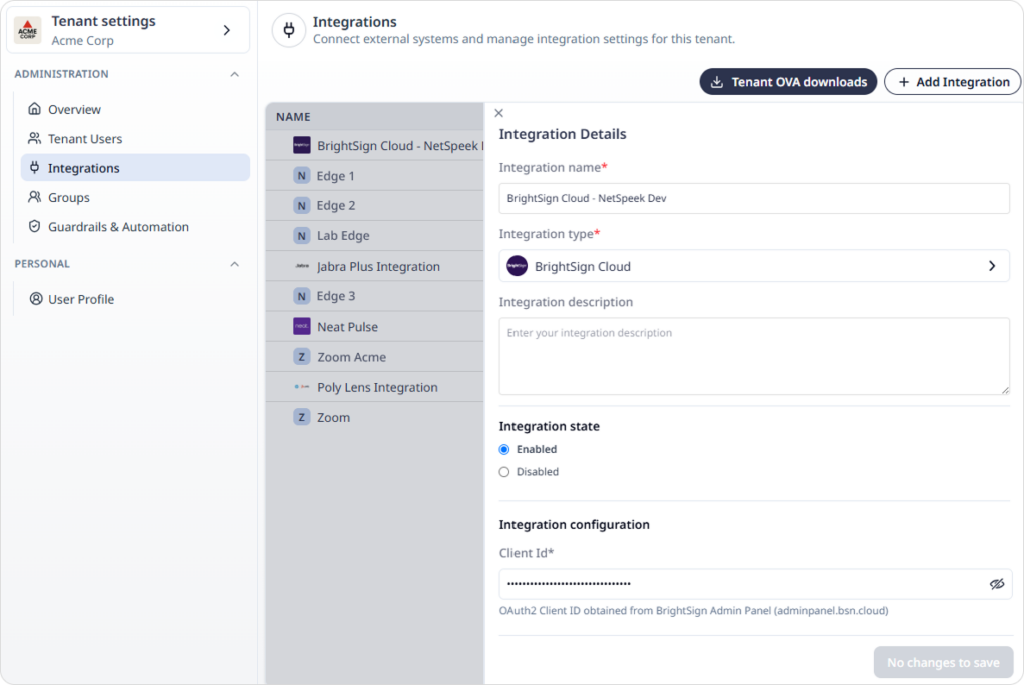
Adding and editing an integration now opens in a sliding side panel instead of a modal, giving more room for configuration. The integrations table shows manufacturer logos. Users with read-only access see a static details view rather than a disabled form.
New and updated device support
| Integration | What’s new |
|---|---|
| Crestron Local (CresNext) | See Crestron information on Supported Devices |
| Biamp Tesira | See Biamp information on Supported Devices |
| Jabra | See Jabra information on Supported Devices Jabra commands describing an unrecognized device model now warn and continue rather than being blocked. |
| Neat Pulse | Devices are now resolved by serial number; see the note above |
Improvements
- Passwords and other sensitive data fields are masked by default. Any configuration field declared as a password or secret (such as certificate information, API keys, etc) now renders as a masked input with a show/hide control.
- Avatar and logo uploads are simpler. Picking a file saves it immediately, there is no separate save step. The size limit has been raised from 1 MB to 5 MB to permit larger files and higher resolution images.
- Settings tables adapt to the window. Users, integrations, and groups tables now keep their headers fixed and scroll within the pane instead of pushing the whole page. Long values truncate cleanly rather than breaking column alignment.
- Names can be edited in place on tenant and profile forms, and changing your password is now behind an explicit “Change password” step.
- Edge OVA download text is clearer. The download tile and modal have been retitled, and each build now shows a status – Available for finished builds, Revoked where applicable.
- Links in release notes open in a new tab rather than navigating away from the console.
- Lena Ask Mode is now available to anyone with Lena access. It previously required defined permissions, which meant some Lena users with restrictive access controls could not use the feature.
Fixes
- Edge OVA downloads failed after the 1.8 release was published. This was an operational issue which has been corrected, both operationally and in software and testing coverage.
- “View Report” sometimes failed to display troubleshooting results. The report path was incorrectly configured on some infrastructure components, so some requests never reached Lena. The path is now part of the deployed configuration.
- Edge release publishing targeted the wrong environment. Missing per-environment configuration caused publishing to fall back to a default device group and fail. Each environment now carries its own settings.
- Date pickers failed to render on forms after a fix was deployed – the fix was rolled back, and replaced with a better one.
Security
This release closes a set of findings from manual analysis and automated dependency scanning.
- Cross-tenant device actions are blocked. Every device action dispatched by Lena – automatic, manual, or pre-approved – now verifies the target device belongs to the tenant the request is running under, before any policy evaluation. Any mismatch returns an identical “device not found” response, so it is not possible to probe for the existence of devices in another tenant.
- User permissions are enforced on Lena-initiated actions. Actions Lena performs on your behalf now run under your identity and permissions on the platform, rather than under Lena’s identity. This closes a gap where Lena could dispatch actions at a user’s request which exceeded that user’s permissions. Automated and scheduled actions (eg Room Check) continue to operate as Lena rather than an individual user.
- Path traversal hardening across the API and the Edge VM. File paths derived from user input – document upload paths, import session identifiers, integration manifests, plugin assemblies, and configuration file names – are now confined to their intended directories.
- Dependency updates addressing published advisories across the platform, Lena, the Edge VM, and the portal – covering HTTP handling, HTML sanitization, YAML and URI parsing, regular expression handling, and the AI framework stack.