
NetSpeek 1.10 August 2026 Release Notes
NetSpeek Platform 1.10 Update – August 19, 2026
This release builds upon the Crestron device support released in platform version 1.9, extending from CresNext to XiO Cloud, and security enhancements extending from version 1.9’s foundation further tighten who can see what.
- Security: Every operation requires a specific permission, records are scoped to the tenant that owns them, and vendor documentation is served through short-lived links that expire.
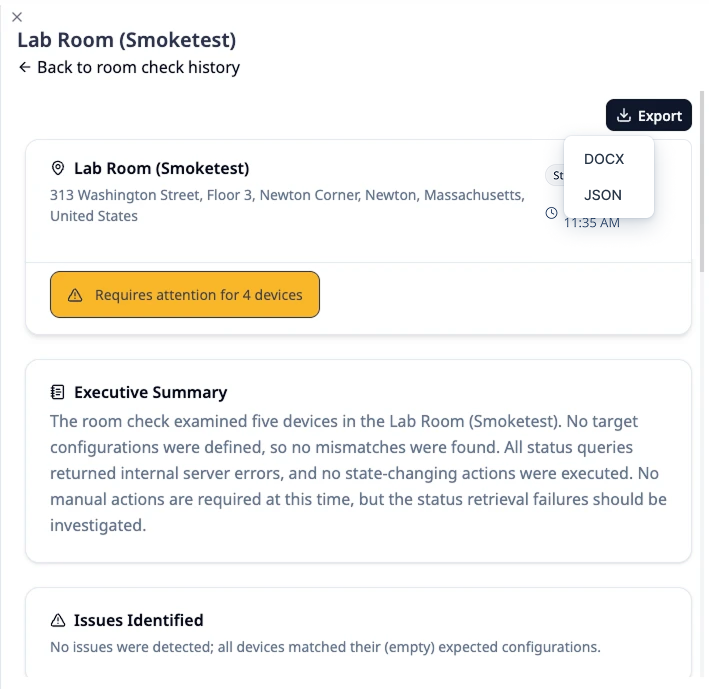
- UI: Room Check Reports are presented section by section and can be exported in .docx or .json, with .pdf format planned.
- Device Integration Improvement: Samsung displays are more accurately differentiated between on, off, sleep, and other power states.
- Device Integration Addition: Support for Crestron’s XiO Cloud allows for orchestrating Crestron devices registered to it, extending on the CresNext support released in platform version 1.9.
Please read first: changes which may affect existing deployments
Device integrations
- LG devices are integrated using a different mechanism, requiring different network ports (now using TCP 9761, no longer using TCP 3000/3001) and providing compatibility with security-related changes made by LG. Edge VM version
1.3.2is now required for supported orchestration of LG devices – more details are available in the LG webOS Integration Guide.- This change was introduced in platform version 1.9 but was inadvertently excluded from those release notes at initial publication. This note is now present in both the 1.9 and 1.10 release notes for visibility.
- Room Check Target States are more resilient to removing/replacing the underlying integration. See the details about this below, in the “Access and sessions” section.
- Samsung display power state detection is more sophisticated. A Samsung display that was powered on but saw no input signal, because the source device (like a room system or PC) providing the signal had gone to sleep, previously appeared to Lena to be the same as a display that was genuinely powered off. NetSpeek has implemented deeper power state detection mechanisms available through Samsung’s MDC protocol and Lena now distinguishes six unique power states (see chart below) and recommends relevant actions based on this more nuanced understanding.
| Samsung MDC’s reported state | What the state means to Lena | Lena’s likely suggested action |
|---|---|---|
| On | Powered on with a live picture | None |
| Off | Confirmed powered off | Power on the Samsung display |
| Asleep | Powered on and responsive, no incoming video | Power on or wake the input source (eg room system or PC) |
| Blanked | Display is powered on, but panel is deliberately blank/black | Issue specific power state commands to turn the panel back on |
| Unreachable | Could not be contacted | Attempt to power the display on via Wake-on-LAN, or physically dispatch |
| Unknown | Reachable, state undetermined | Investigate or physically dispatch |
- Volume, mute and input states are unchanged and continue to be reported as before.
- Based on the integration’s improved depth, displays can now also report hardware health details such as information about lamp, temperature, fan and brightness sensor faults.
- The new Samsung MDC integration released with platform version 1.9 relies on Edge VM version
1.3.3to communicate with the displays.
Room Checks
Room Check administration and visualizations have changed. The Room Check workflows for scheduling, initiating, and viewing reports now appear within the main workspace area (similar to where Room Canvas is visualized), and the overall appearance of Room Check Reports has been revamped. Reports can be exported in .docx and .json format now, and .pdf format export is planned for a future platform release.
Room Check Target State actions bound to a removed integration no longer appear.
Previously, if an integration was unlinked from a device and a replacement integration was added afterward, a Target State action still bound to the original integration stayed in the list of actions for that Room Check and was still attempted when the Room Check ran.
Now, those actions are hidden from the UI and are skipped when a Room Check executes. Actions bound to an integration that is only deactivated (but not deleted from your tenant) remain visible, so a dormant integration can be reactivated without reconfiguring your Room Checks.
Hiding an action does not repair the stored configuration, so an action bound to a removed integration still has to be set up again against the current/active integration.
This may affect you if you deleted an integration (for example a first Edge VM) and replaced it with a newer one of the same type (a second Edge VM) while Room Check Target States were configured to send commands through the original. Previously those Target States looked valid while still pointing at the removed integration; now they neither appear nor run. If in doubt, verify your Target States behave as intended, and for total assurance delete and recreate Target States using your currently operational integration.
Access and sessions
Tenant-aware permissions are extended to all operations/actions. Every operation requires a specific permission – this is an extension of the tenant-aware permissions functionality introduced in platform version 1.9. Some tasks now require specific role-based permission, such as viewing your own profile, transcripts, images and real-time monitoring. This is foundational work for future RBAC granularity.
Vendor documentation
Vendor documents are served through signed links that expire. Opening a document from an older conversation generated a renewed link on demand, so documents referenced in old conversations remain accessible.
New features
Crestron XiO Cloud Integration Support
Crestron devices are now supported through XiO Cloud. In addition the the CresNext support released in platform version 1.9, platform version 1.10 adds support for Crestron XiO Cloud – see the integration guide here: https://docs.netspeek.ai/device-platform-integration-guides/crestron-xio-integration-guide/
Structured Room Check Reports
Room Check Reports are presented as structured, consumable information. The executive summary, issues found, resolution plan, any devices whose status could not be confirmed, and the process steps each occupy their own section, with severity shown on each issue. Tables and lists inside the process steps render in an easily readable format. A report can be exported in .docx or .json format as shown below.
Vendor documentation open inside the main workspace
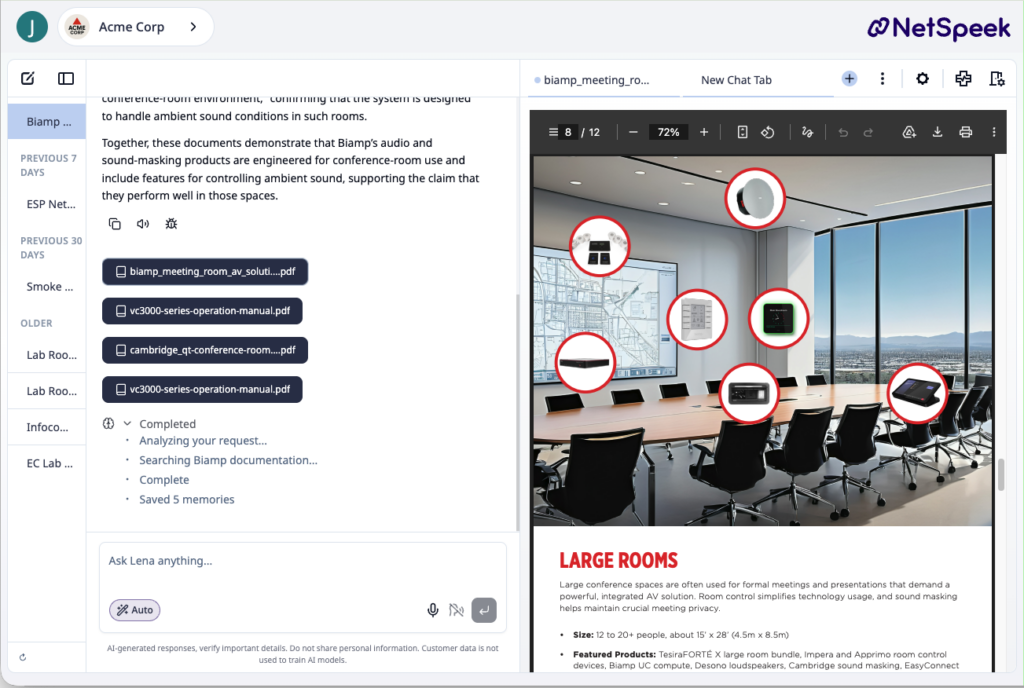
When Lena cites vendor documentation, clicking that document opens in it the primary workspace rather than in a separate tab, as shown below.
A support reference for any Lena conversation
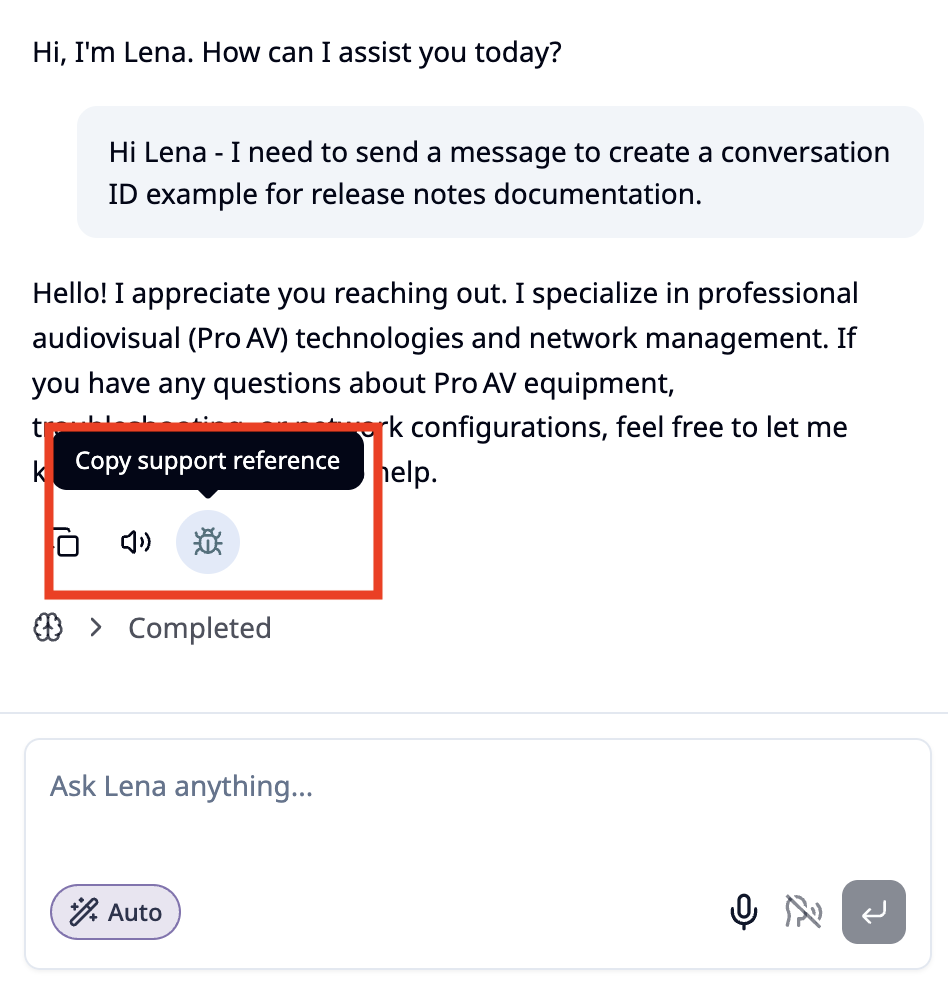
Every Lena conversation has a conversation identifier that uniquely describes that interaction in NetSpeek’s infrastructure. Platform version 1.10 exposes that Conversation ID to users, to aid in interactions with NetSpeek Support. Clicking the “bug” icon as shown below copies the Conversation ID to the user’s system clipboard, which can then be pasted into correspondence with NetSpeek. The Conversation ID format identifies the environment (eg Beta or Production), the tenant name, and the unique conversation identification value. At a customer’s request, NetSpeek can then use this value to find a specific conversation for supporting customers, investigating problems, or improving Lena’s responses.
These IDs appear in the format of:
Environment-TenantName-ConversationID – two examples of this format in action are below.
Beta-InternalDemo-ChatID-7d063ac7-f435-4e3f-ad38-0851c645ab64
Prod-QATest-ChatID-2f70e4ce-91e2-4bb8-9360-2011fc4c3722
Logi Sync device reboot
Logitech recently added a reboot API to Logi Sync, and NetSpeek has implemented it. Note that based on Logi Sync’s present implementation of this functionality, a requested reboot is queued in Sync and may not be performed immediately, or in some cases at all. Logi Sync will discard the reboot request if the reboot does not reach the front of the queue for dispatch within 5 minutes.
Improvements
- Enhanced tables throughout the NetSpeek portal. Tables across the portal now behave consistently, with sorting, filtering, column sizing, row selection and search everywhere, and locations appear as a breadcrumb in the tables that show them.
- Room names are matched exactly. Lena resolves a room name against the tenant’s own location tree before searching, so a shortened or partial name no longer misses devices. Where a name matches more than one room, Lena asks which was meant.
- Asking about a power distribution unit (PDU) can finds it without naming a location. Lena now identifies PDUs by their category and model, so a question that does not specify where the device is located can still find the right one.
Fixes
- Brief network interruptions are less likely to sign users out. Where a session cannot be restored when network connectivity to the browser is recovered, the NetSpeek portal offers the browser a retry opportunity, to maintain the established session rather than returning the user to the sign-in page.
- The Edit User Roles dialog clipped the tenant scope tree on deep hierarchies, leaving the confirm action out of reach.
- Device model and manufacturer images could overflow their assigned space on device forms and in device lists.
- Room Checks breadcrumbs did not match a floor recorded as an integer number against a floor named with a prefix, for example
1vsFloor 1. - The tenant switcher nested sibling tenants underneath the active tenant when the signed-in user was scoped to a child, so the list did not reflect the real tenant structure.
- Vendor PDFs could fail to open, reporting a document loading error.
- Leaving Room Canvas with unsaved changes no longer reloads the page, so saving or discarding is immediate.
- A Room Check Report now opens for anyone entitled to see it, regardless who scheduled or initiated the Room Check.
Security
- Vendor documents are held in private storage and delivered through signed links that expire. Embedded documents are accepted only from recognized hosts, and reopening an older conversation issues a fresh link.
- Every operation across NetSpeek requires a specific permission, and access is refused where no permission applies.
- Lena conversations are readable only by the user who created them.
- Tokens are verified for signature, lifetime, issuer and audience before they are trusted, and checked against revocation. Internal service tokens are capped at 48 hours and default to 24.
- Tenant names accept plain text only, and values placed into outbound email are encoded.
- Dependencies were updated to current patched versions across all five components, and build workflows pin third-party actions to fixed revisions.