
NetSpeek 1.16 November 2026 Release Notes
NetSpeek Platform 1.16 Update – November 4, 2026
NetSpeek’s version 1.16 platform release makes it easier for AV and UC teams to validate the readiness of spaces at scale, extends device support into network infrastructure through orchestration of Netgear AV switches, expands on version 1.15’s support for Q-SYS devices, and enables an audit trail of events within a NetSpeek tenant.
Space Profiles group similar rooms so you can define shared Target States and schedule Room Checks across room type templates. Netgear AV switch orchestration enables new visibility for troubleshooting room networks, and expanded Q-SYS Core device support extends upon the foundation built in the 1.15 release. The initial release of Compliance Center provides time-stamped, user-attributed auditable logging of relevant events and actions taken within a NetSpeek tenant.
Please read first: changes which may affect existing deployments
Space Profiles: shared settings and local schedules
Changes to a profile’s Target States apply to the next checks for the rooms using that profile. Review the rooms in the profile before changing their shared settings. Space Profiles is a newly-released feature – see the details below in the New Features section.
Shared schedules use each room’s time zone, determined by its configured geographic position in the location hierarchy. A room without a recognized location time zone uses UTC as a fallback.
NETGEAR switches: setup and saving configuration
Commands sent to switches affect the running configuration but will not by default persist through a reboot; save them to the startup configuration if they should be kept. If you use NETGEAR Engage AV profiles, continue to conduct backup procedures through Engage. Netgear switch device support is a newly-released feature – see the details below in the New Features section.
Device support: controls for Logitech MeetUp (original)
A first-generation Logitech MeetUp added to a Room Canvas no longer offers CollabOS-only actions. Use the supported Logitech Sync or USB controls for that device and its room setup. Note the MeetUp 2 has different capabilities.
User Interface: Integrations → Connectors nomenclature transition completion
The word “Integration” and similar forms has been replaced with “Connector” in the user interface. The nomenclature transition on NetSpeek Docs remains in-progress.
New features
Configure and run Room Checks at scale with Space Profiles
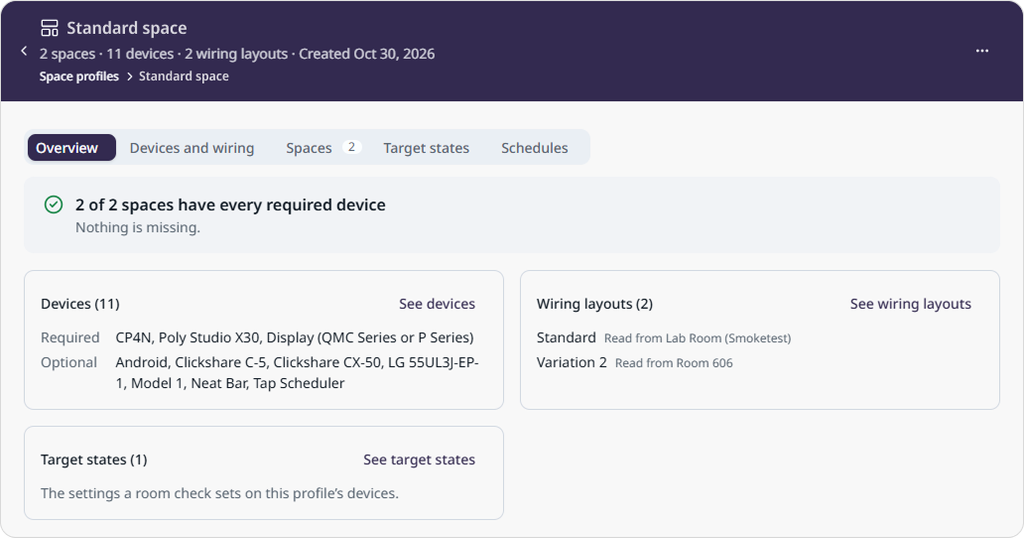
Space Profiles let you group similar spaces, such as huddle rooms or conference rooms that use a room standard or fairly-consistent set of equipment, and manage their shared settings and Room Checks in one place. With this initial release, you can define a Target State once for the group and schedule Room Checks across the Space Profile, turning Room Check setup, scheduling, and modification into a scalable bulk actions workflow.
For example: bring all your huddle rooms into a Space Profile, define the desired Target State for daily readiness, and schedule a morning Room Check for the entire group. Each check uses the local time of the specific room being validated, so an “8 AM Room Check” occurs at the expected time everywhere you apply it. When you update the shared Target State, subsequent Room Checks across all rooms in the Space Profile use the revised settings – so you can change what is checked or enforced on hundreds or thousands of spaces from within one profile.
To get started, open Space Profiles in the sidebar and select New profile. Choose existing rooms that are set up alike, select Find what they share, then review their required and optional devices and wiring layouts before naming and saving the profile. This review captures the equipment the rooms share and the permitted differences. Saving a profile leaves the rooms and their equipment unchanged.
Use Target States to define the group’s shared device settings and actions. Check a space previews how those actions map to a selected room and identifies any that cannot apply there; the preview does not send commands to room equipment. In Schedules, set when Room Checks should run across the rooms in the profile.
Note
The Space Profiles feature depends on newly-added SpaceProfiles:Read and SpaceProfiles:Write permissions, and previously-released permissions related to Target States and Room Check scheduling. The workflow is available to Owner, Administrator, and Manager roles. For details see Role-Based Access Control (RBAC) Implementation Guide.
Orchestrate the network with Netgear AV switch support
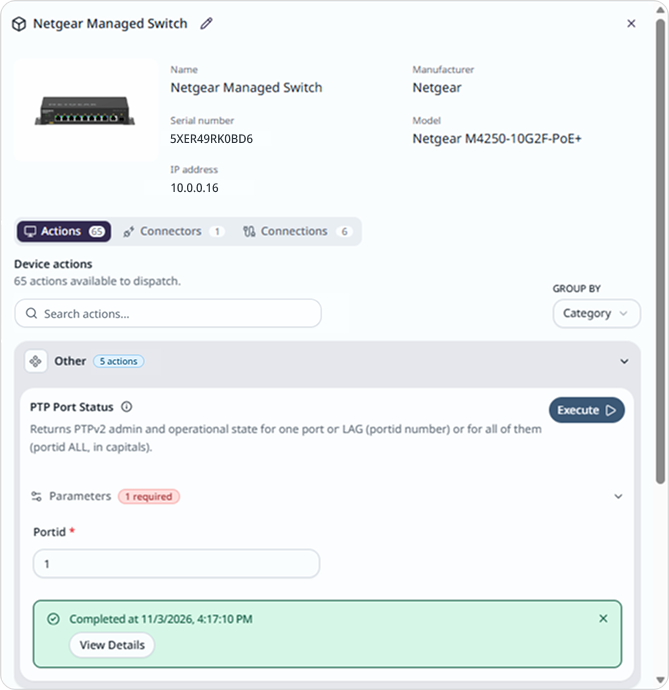
NetSpeek is extending orchestration capabilities and instrumentation visibility beyond the conference room and into the network and power infrastructure supporting your spaces. Add a supported Netgear M4250 or M4300 switch to a Room Canvas, then open its Actions tab or ask Lena to inspect port status, connected devices, VLAN settings, PoE status and the switch’s power budget, and numerous other parameters.
You can also review multicast and other settings, run ping and traceroute commands, and make supported changes such as enabling a port or adjusting IGMP snooping. The Connector reaches the switch through your Edge VM as documented in the Netgear Integration Guide.
This release supports over a dozen M4250 and M4300 switch models – see the full list and available commands in Supported Devices and Controls.
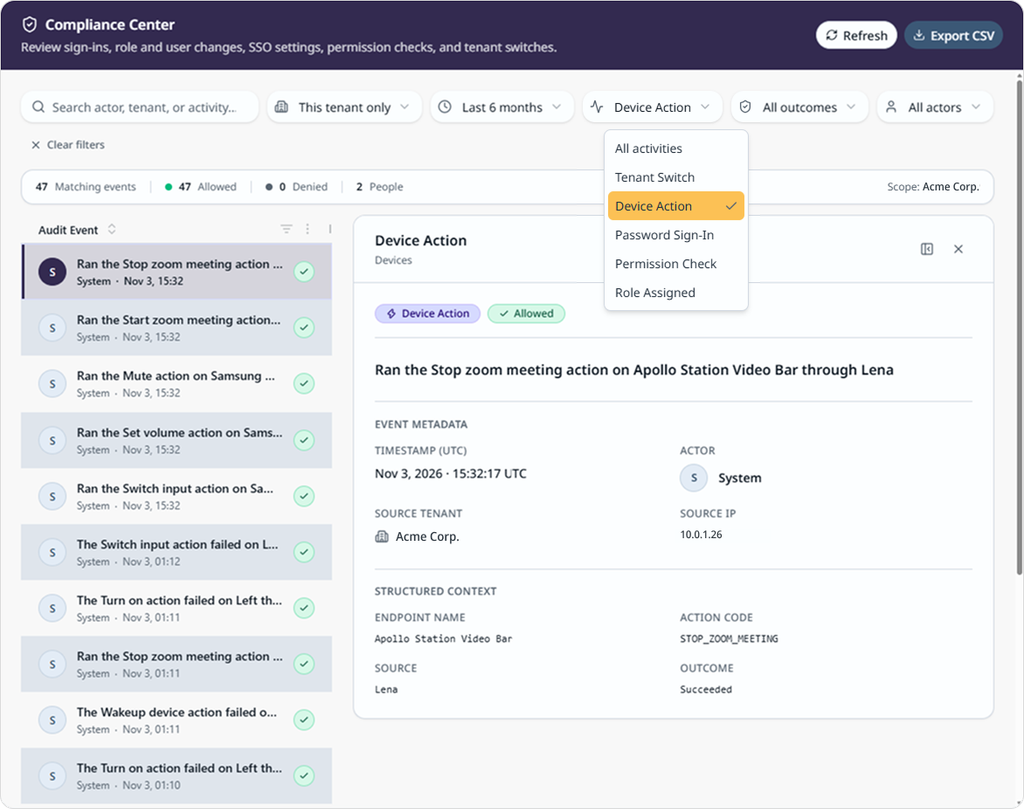
Review user access and device activity in Compliance Center
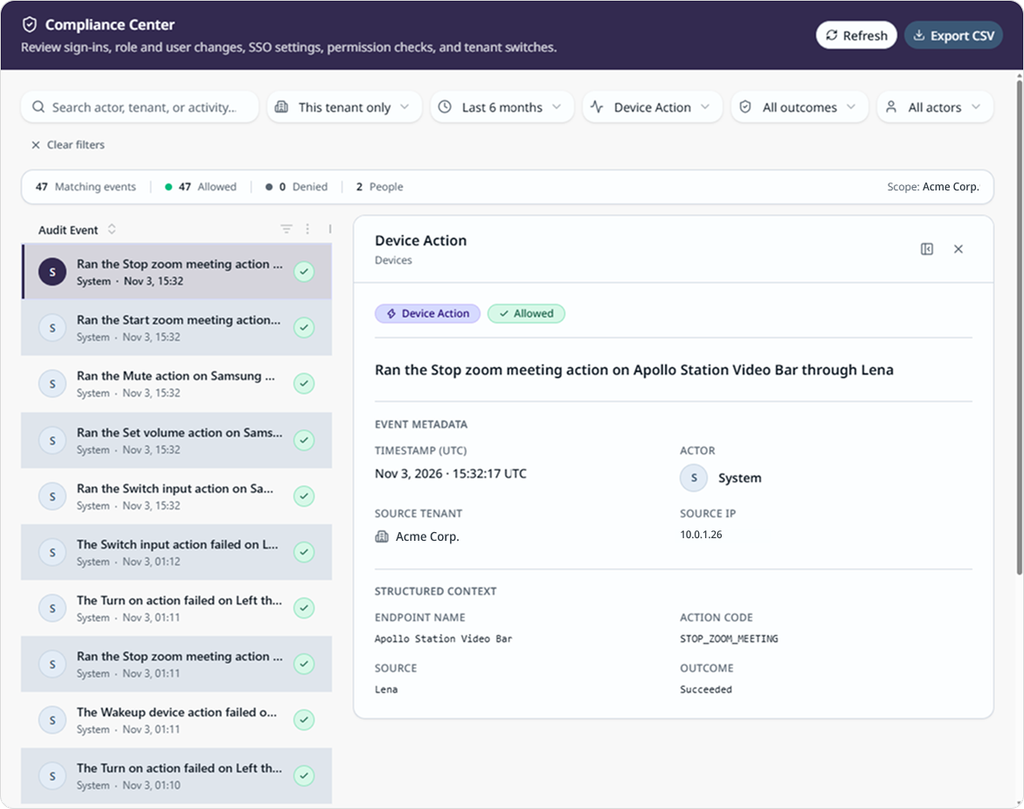
Compliance Center gives authorized team members a place to review sign-ins, access changes, and device actions. Security enforcement and auditability is enabled by viewing user and role-related actions. From an operational focus, when investigating an unexpected change to room equipment, you can check who initiated an action, when it happened, and its recorded outcome.
Open Compliance Center by selecting it from the lower-left navigation. Filter the records by time, activity, user, or outcome, open an event for more detail, or export the results as a CSV for review by relevant personnel.
The event list shows the latest 500 matching records. CSV exports contain the latest 10,000 matching records. A search can look historically up to six months.
Note
The Compliance Center feature depends on newly-added Audit:Read permissions. The workflow is available to Owner, Administrator, and Manager roles. For details see Role-Based Access Control (RBAC) Implementation Guide.
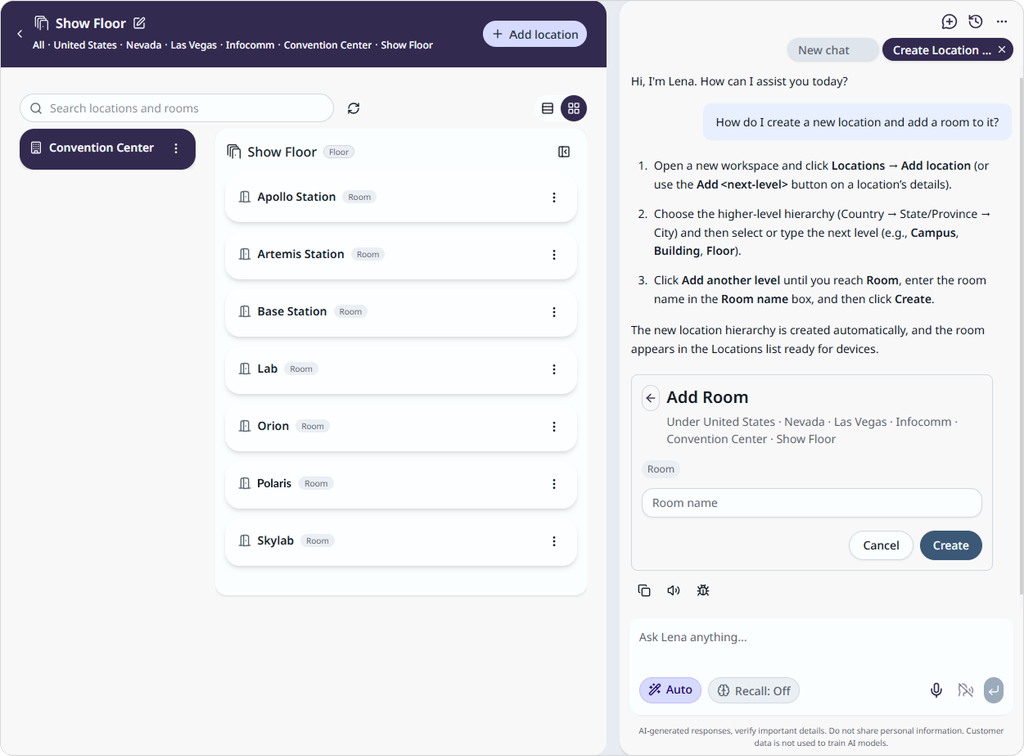
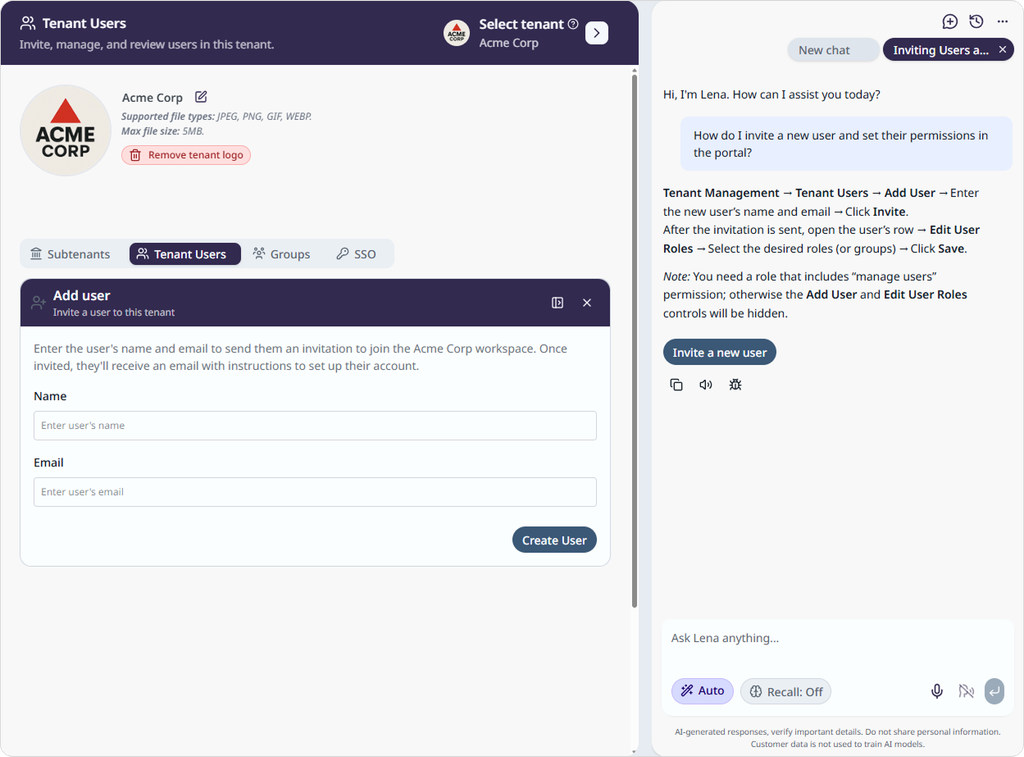
Execute NetSpeek platform management tasks directly from a chat with Lena
Ask Lena to help with administrative actions using the “How to” area of a new chat window, like adding a room or inviting a colleague, and she can help you conduct the next step without leaving the conversation. For example, ask to add a room to the building you are viewing, or to invite a user to the portal, and Lena opens the relevant form on your behalf.
You review the details and submit the information. The assistance Lena provides is based on your role’s permissions, so Lena offers only tasks you can perform in the NetSpeek portal.
Improvements
User Interface
- Keep a different room open in each browser tab. Each NetSpeek portal tab in your browser keeps its own set of workspaces, including after a browser reload, so moving between rooms in one tab does not replace the workspaces in another.
Fixes
- Recurring Room Checks were previously evaluated using the time-zone offset in effect when the schedule was created. They now use the location’s local time zone, so they keep the selected local time and weekday when daylight saving time changes.
- This fix was released prior to DST changes on November 1, 2026 – all Room Checks should run at the appropriate room-local time, regardless when they were originally configured, and no corrective action is required by users.
- Sub-Connector configuration is limited to compatible parent Connectors: the parent selector offers the Connectors that can support the sub-Connector you are adding.
- Reloading the NetSpeek portal tab of your browser could reopen a different Lena conversation. The active conversation is now restored.
- A failed device action could show only a generic error. The NetSpeek portal now displays the available failure details to help you decide what to check next.
- Crestron device connections from the Edge VM over HTTPS could fail in some conditions. The Connector now handles these conditions more effectively.
Known Issues
- USB commands to Logitech devices using the NWRS-USB Connector can fail when using the serial number exposed in Logi Sync Cloud; the device may require a similar but non-identical serial number for USB connectivity.
- This serial number can be discovered using the NWRS
Get Statuscommand on the Windows Compute, then parsing the results to reveal the USB serial number of the device. Contact your NetSpeek representative for assistance with this step if needed. - This issue has been reported by NetSpeek to Logitech.
- This serial number can be discovered using the NWRS
Security
- This update includes security enhancements.
Versions list
The table below identifies the versions included in this release for the NetSpeek platform and related components – note that in some cases a component may not have a new release corresponding to a platform update.
| Component | Version |
|---|---|
| NetSpeek Platform | 1.16 |
| Edge VM | 1.6.1 |
| NetSpeek Windows Runtime Service | 1.3.0.7 (no change from prior platform release) |
© NetSpeek Inc. 2026