
NetSpeek 1.12 September 2026 Release Notes
NetSpeek Platform 1.12 Update – September 11, 2026
This release includes the general availability version of the NetSpeek Windows Runtime Service (NWRS), which is used to orchestrate Windows OS devices. Many new features are included from the prior NWRS version, notably the ability to install and update NWRS using Microsoft Intune.
Platform version 1.12 also extends device coverage to include Avocor H-Series displays, and builds on the Samsung power orchestration enhancements released in platform version 1.10, adding an optional feature to use detected power state details to decide whether a reboot is carried out or blocked on Samsung devices.
Note
The prior release was 1.10 and this release is 1.12 – that is not an error. Version 1.11 describes development work which was not included in a published release.
Other new features and details:
- Device integration addition: Support for Avocor H-Series interactive displays, using a new network port (TCP 4664) not required for other integrations.
- Device integration improvement: Samsung display reboots are performed as a power-off/power-on cycle, which works on models that reject the MDC protocol’s reboot command. Separately, reboots can be made status-dependent for each display – see the Samsung MDC Integration Guide for details about the new
Advanced power status verificationconfiguration setting. - AI troubleshooting (Lena): Actions are matched specifically against what can be done with a particular device, so an action a device does not offer is refused clearly if a user asks Lena to attempt it. Additionally, Lena asks which integration to use when a device offers the same action through multiple methods (eg, if a command is available to a device through both a cloud integration and an Edge VM integration).
- UI changes include:
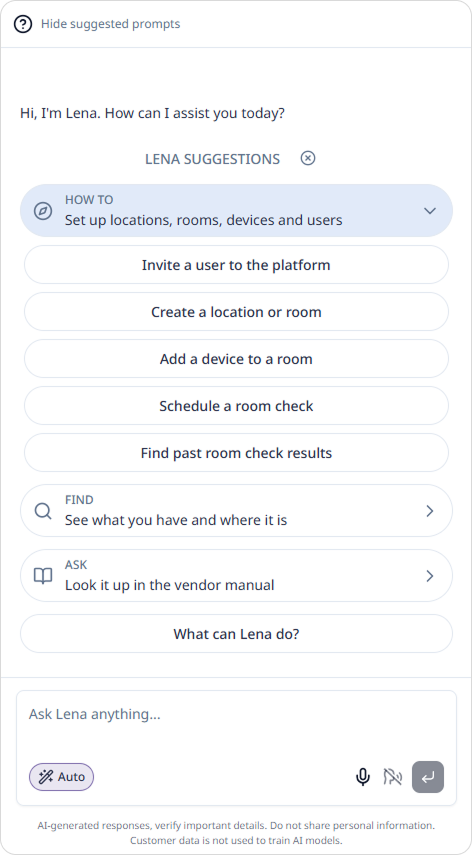
- New Lena conversations open with suggested prompts, offering users an easy way to start a conversation with Lena and explore the platform.
- Device serial number is optional to support device types without a clear serial number concept (though still strongly advised for devices that do have serials).
- The Location column in the device table collapses to a breadcrumb trail, making more space in the interface for other elements.
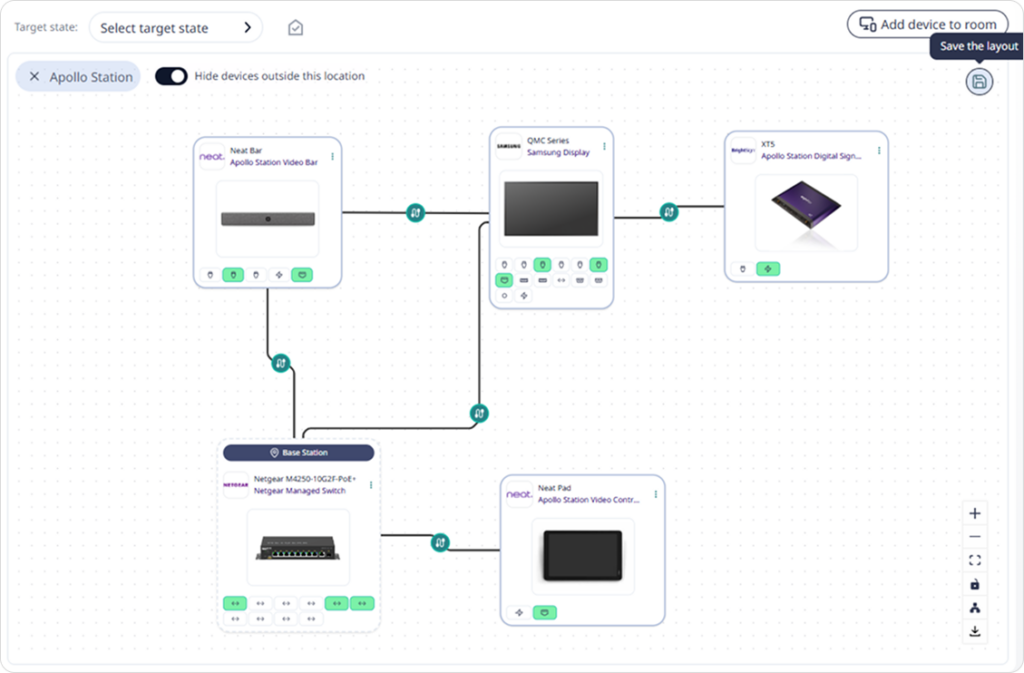
- A room with no saved layout for its Canvas opens as a grid (this is a preparatory capability which will be used in conjunction with an upcoming feature).
- Device management: The NetSpeek Windows Runtime Service’s manual installer has had a makeover, including improved graphics and visualizations, automatic firewall rule configuration, and the ability to set a custom listening port on the Windows OS device. It can also now be installed and kept up to date through your own Microsoft Intune, offering both small-scale manual installation and Intune-managed large-scale fleet installation and update options.
Please read first: changes which may affect existing deployments
Device integrations
- Avocor H-Series displays (newly supported in platform release 1.12) are reached on port TCP 4664 by default, which may require network configuration changes in some environments. (The port is Avocor’s default but is configurable and may have been set to a different port on the device – see the integration guide for details on this, and other settings like Wake From Sleep.)
- Samsung displays: Reboot is performed as a power cycle. Issuing the newly added “reboot” command (introduced with platform 1.12 and corresponding Edge VM release
1.4.0) technically turns the display off, waits a few seconds, and turns it back on. A successful reboot of a Samsung display takes about fifteen seconds to register as complete, because the display must reconnect to the network before reporting its status again. - Samsung displays: Reboot can be power-state-aware for each display. The new
Advanced power status verificationparameter (off by default) can be enabled for a display in its integration settings. With the feature enabled, Lena will not issue a reboot (power cycle) command in the two situations below (she reports the reason to the user).
| Situation | Why the reboot is withheld |
|---|---|
| The display is asleep | The device is powered on and responding to network traffic, even though the display is asleep/blank. A power cycle of the display will not resolve a separate problem (eg an input source that stopped sending video) and rebooting the display could be disruptive to the room without resolving an underlying problem with a separate device. |
| Network Standby is disabled in the display’s settings | When enabled in Samsung’s settings, the display disconnects from the network the moment it powers down, so the second half (power-on) of Lena’s power-off/power-on cycle would have no path to the display. The display would stay off until a physical dispatch to the room powered it on again. |
- A display that does not report its Network Standby setting is allowed to reboot.
- Samsung
Advanced power status verificationcan prevent a power cycle, and does not add a power command of its own. With the configuration off, a reboot command carries out the power cycle without reading the display’s power state first. - Samsung power state detection enhancements were released in platform version 1.10 and are unchanged here – power status verification builds on top of that foundation. See the Samsung MDC integration guide for details.
Devices, Locations, and Rooms
- Device name, serial number, and IP address are limited to 64 characters. A longer value is now refused when a device is created or updated. Previously an over-length value reached the database and returned a server error that did not identify the offending field/value.
- A device serial number is no longer required. The serial number field is now optional on the device form, to better support device types (such as Windows OS devices) where a traditional serial number concept may not exist.
- NetSpeek still strongly recommends including serial numbers for all devices that have them – some integrations require a serial number.
- The Location column in the device table collapses to fit. A long location path now shortens to the width available and stays left-aligned, with the hidden portion in an overflow menu. Clicking a level filters the table at that level and fills in the menus at the top of the page.
- Location context is cleared when signing in or switching tenants. The location hierarchy and its cached levels now start empty and reload, so you may encounter a momentarily empty location hierarchy (where cached but potentially outdated hierarchy used to appear immediately).
- A room with no saved layout opens on a grid. Rooms whose devices were not added from a Canvas, and which therefore have no saved layout, previously appeared with devices staggered/cascaded across the Canvas. They now open arranged as a grid – this is intended as a visually helpful default, but the arrangement can be modified and saved as before.
- This is mostly preparatory work for an upcoming feature not included in version 1.12.
Lena and device actions
Commands requested by a user are verified against actions available for the device. Actions requested are matched against the device’s list of available actions at the moment the command runs, rather than Lena attempting to do anything a user requests in conversation. This means:
- An action a device does not support is refused, instead of being attempted at the user’s request.
- A request that requires different actions, such as asking for both status and a device reboot in a simple prompt, is refused. Lena names all requested actions she detected, and asks the user for clarification about what they want to do, rather than resolving the prompt to perform one of the detected action requests.
- Where a device offers a requested action through two integrations, such as a cloud service and an Edge VM, Lena asks first which integration to use before dispatching the action.
Room Check reports name the actions Lena could not perform. An action that cannot be matched to an active integration on a device in the room is listed in the Room Check Report as an action not performed.
Questions about a model rather than a Room are answered from documentation. Asking how to fix or solve something while naming only a manufacturer or a model, with no Room or Device from your tenant in the question, is answered with general guidance from vendor documentation. Naming a specific Room or Device still starts live troubleshooting.
Vendor documentation access
Lena citations in answers provide the document, not a link to it. Document links are no longer stored, including in conversation history and in troubleshooting reports. This means that older conversations (which occurred prior to the 1.12 release on September 11, 2026) may have documentation citations which cannot be opened. In these cases, start a new conversation with Lena asking the same question, or continue the conversation in the existing session and request the documentation again.
Room Check emails
The link in a Room Check email leads to the detailed report. When a Room Check finishes, the email NetSpeek sends now includes a link which opens the report (when the Room Check results produced one), and otherwise opens the Room Checks interface filtered to the room that was checked. Emails already in your inbox from prior to the version 1.12 release do not lead to the report, because those emails do not include the current link format. Review older reports from the Room Checks interface in the portal as needed.
Network and firewall requirements changes
New device integrations, or changes to existing integrations, included in this release add the new connectivity requirements listed below.
| From | To | Port | Purpose |
|---|---|---|---|
| Edge VM | Avocor H-Series display | TCP 4664 outbound | Display control and monitoring (new in this release) |
| Orchestrated Windows OS device | NetSpeek platform, and the temporary Amazon S3 download URL it returns | TCP 443 outbound | Automatic updates for the NetSpeek Windows Runtime Service (new in this release) |
See Network and Firewall Requirements for the full list of platform requirements, for this release and prior.
New features
Avocor H-Series display support
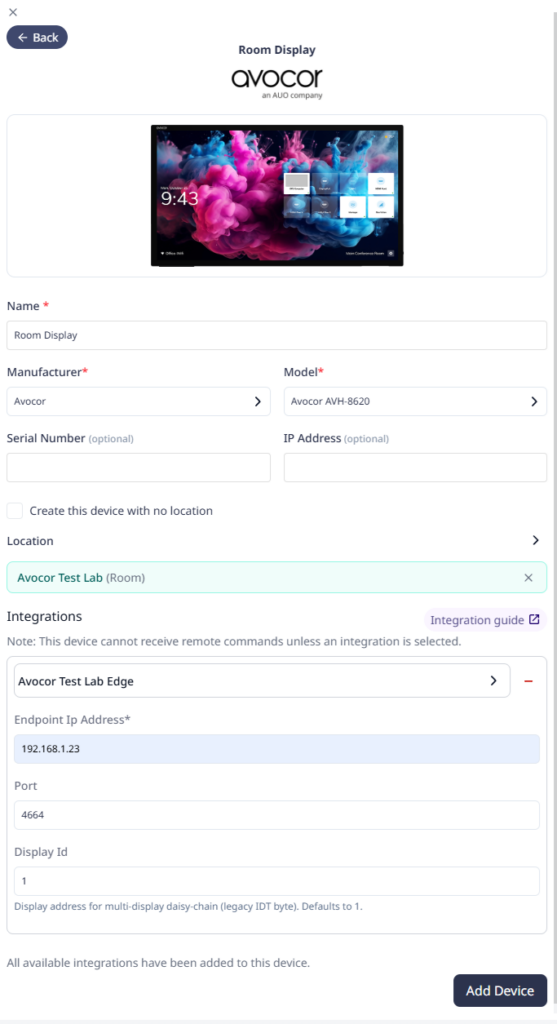
Avocor H-Series interactive displays are now supported through the Edge VM (minimum Edge VM version 1.4.0). Platform version 1.12 adds support for Avocor AVH-6520, AVH-7520, and AVH-8620.
These displays can be powered on and off and report their power state, switch and report the active input, set and report volume, mute and unmute, and set and report brightness, contrast, and color temperature. No device login credentials are needed; a display is added with its IP address, and optionally a network port if it does not use Avocor’s default. A display ID may be required in some environments. See the integration guide and supported devices for details – some limitations currently exist.
Automatic updates for the NetSpeek Windows Runtime Service through Microsoft Intune
The NetSpeek Windows Runtime Service (NWRS) is NetSpeek’s software for orchestrating Windows OS devices. Until now it has been in limited-distribution testing, installed manually one computer at a time, from an MSI NetSpeek supplied.
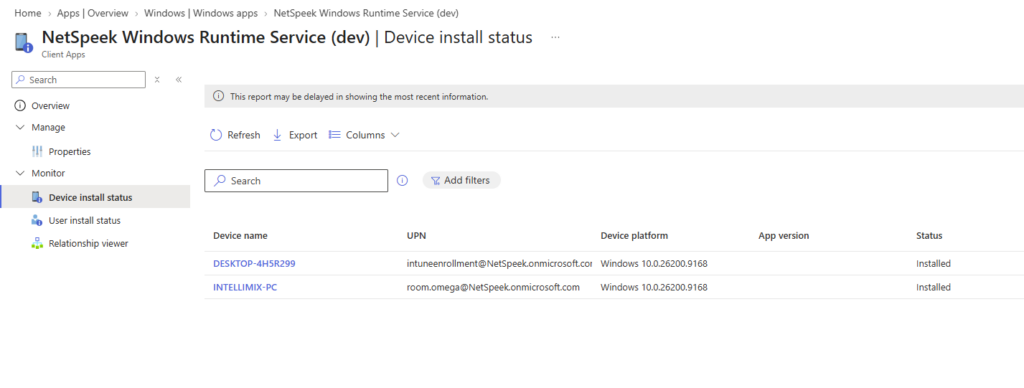
While the manual process for individual PCs is still supported (and has many ease of use enhancements in this release), NWRS can now be installed and kept up to date through your organization’s Microsoft Intune environment instead.
Setting up Intune management of NWRS is a one-time event. NetSpeek’s integration setup will need to know your Microsoft tenant, the email address of an administrator who can consent to deploying the software, and the Entra device group that should install the NWRS. Your administrator receives a consent request by email and approves it, and NetSpeek then provisions a single new application in your Intune environment and assigns it to that device group.
From then on, computers in your defined device group install the NWRS automatically and keep it current as NetSpeek releases new versions. A computer asks the platform which version its update channel offers, so there is no new Intune package to accept for each release of NWRS. A computer checks that an installer carries a NetSpeek code signature and matches the published checksum before running it, and a computer that cannot confirm the current version does not change what is installed. Intune displays installation notifications on the computer as it works.
A computer running an earlier iteration of the NWRS (from prior to the platform version 1.12 release) needs to be reinstalled with the version in this release before Intune can manage it. Earlier versions do not support the update mechanism or have Intune manageability.
Suggested prompts in Lena
A new Lena conversation now opens with a panel of suggested prompts, grouped by what they help you do. Opening a topic group shows examples of questions you can ask – choosing a prompt either sends it to Lena immediately or, for some question types, places it in the message box without sending to Lena so you can modify the question before sending it. The panel can be hidden and shown again from the conversation header, and it closes once a conversation is under way.
The prompts are a fixed set of examples, the same for all NetSpeek users, not suggestions drawn from your own Rooms and Devices.
Lena knows which room you are working on
Asking Lena about “this room” now invokes context about the room you are currently working on. On Room Checks and Room Management, Lena takes room context from the main work area (eg, from Canvas, or from the Room Check you are reviewing). While working on the device list, conversational context continues to use the location hierarchy (eg, Rooms in your New York office) you have filtered to.
Vendor documents open in the workspace, whichever format they are in
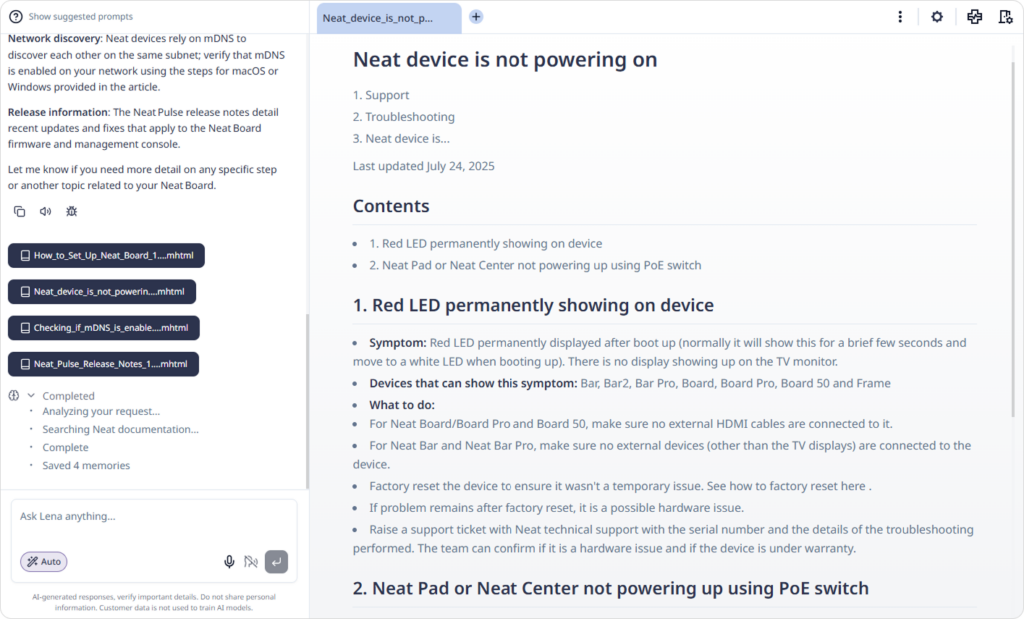
Vendor documentation that is not a PDF now opens in the workspace alongside PDFs, rendered as formatted text with its images in place. Opening a citation goes to the page the answer came from, and moving to another portion of a document you already have open no longer reloads it.
Improvements
- Device status reports the NetSpeek Windows Runtime Service version. A status check on an orchestrated Windows OS device now includes the version of the NWRS it is running, so you can see if computers need NWRS updates. Where the version cannot be read (such as with older iterations of the NWRS), the rest of the status is returned as before.
- Table headers are easier to read. Header text and the column resize handles use lighter tones, so headers are more distinguishable from the rows beneath them.
- Sign in problems are described more specifically. When your profile cannot be loaded, the error message is now descriptive, and differentiates if the platform could not be reached, if the platform responded with a specific error, or if the browser is offline, rather than reporting all of these scenarios as expired sessions.
Fixes
- A device previously could not be saved when its integration settings have no mandatory fields, and the overlapping device settings value was left blank. An example of this condition was Poly Lens, where the only integration value needed is serial number, which is configured in the device-level settings, and was previously requested again at integration-level settings.
- The device-level serial number field is now optional, there is no duplicate serial number configuration requested at the integration-level, and a device can be saved with an integration defined but no serial number configured. However, for a device type with this behavior, the integration actions will not function until the correct serial number is configured on the device-level settings.
- The device form now also disables Save while an integration’s configuration is still loading, so a device is not saved before its integration requirements are known.
- Editing an action in a saved Room Check Target State previously moved it in the execution order. An edited action now keeps its position, and newly added actions continue to be placed at the end.
- Planned future enhancements will permit manual editing by users of the order of actions executed during a Room Check. Currently actions are executed in the order they were configured in the Target State.
- The sibling menus in the Location breadcrumb bar came up empty when a Location cell was clicked in the device table.
Security
- A device action refused because the device belongs to another tenant now returns a generic access denied message. The exposed refusal message no longer carries device identifiers or the relationship between tenants.
- Vendor documents are held in private storage and delivered through signed links that expire. A link is issued dynamically when you request a document and applies to that session specifically. Document links are not stored in conversation history.
- Formatted vendor documents are sanitized before they are displayed. Scripts and executable links are removed, and images are accepted only from the document itself or from vendor storage.
- The NetSpeek Windows Runtime Service verifies the checksum and the NetSpeek code signature of an installer it has downloaded before running it, and does not install one that fails either check.
- Dependencies were updated to current patched versions across the platform (including the admin portal, the Edge VM, and the NWRS), improving authentication token handling, service documentation parsing, URI parsing, and secure file transfer.