Sennheiser Integration Guide – Sound Control Protocol v1 (SSCv1)
This document serves as a comprehensive guide that outlines the prerequisites required to successfully integrate Sennheiser devices compatible with SSCv1 (Sennheiser Sound Control Protocol version 1) with the NetSpeek platform.
Prerequisites
Before beginning the integration, confirm the following:
- Your Sennheiser device is powered on and connected to the same network as your NetSpeek Edge.
- You have deployed a NetSpeek Edge client as described here: https://docs.netspeek.ai/netspeek-edge-installation-guide/
- Note that this integration guide is intended for Sennheiser devices compatible with the SSCv1 protocol, such as the network-enabled chargers and rack receivers described in Sennheiser’s documentation here: https://docs.cloud.sennheiser.com/en-us/api-docs/api-docs/sound-control-protocol-sscv1.html
- This guide assumes the Sennheiser equipment is deployed and operational, and ready for third-party control. Steps to achieve this, such as initial configuration via Sennheiser Control Cockpit, are addressed by Sennheiser and are outside the scope of this guide.
Note
This integration requires an Edge running software version Beta7 or later.
Step 1. Add Device to NetSpeek Room Canvas
Device Provisioning Flow
- In the NetSpeek Console, navigate to left sidebar and click Room Management
- Select the room you wish to add your Sennheiser Device to
- Click Launch Room Canvas
- Click Add device to room
- Choose your Sennheiser device (such as a rack receiver or network-enabled charger) from the device model list.
- Select a previously created NetSpeek EdgeClient integration, and ensure that the Edge client is on a network that can reach the device’s configured IP address
- In the configuration panel, enter the following fields:
- Device IP Address (static/reserved IP, or DHCP)
- Device Port (Default is 45)
- For certain Wireless System Models ( EW-DX EM 4 Dante, EW-DX EM 2 , etc…)
- Device Username
- Device Password
- TLS/HTTPS Enabled (Optional)
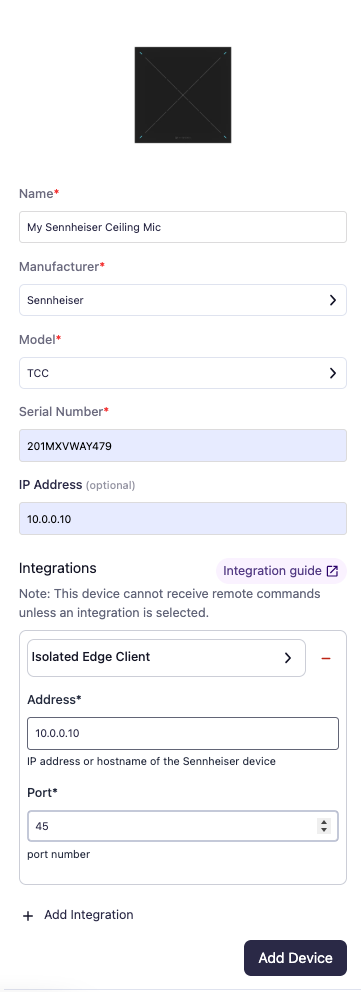
Verification
Once credentials are configured:
- To validate the integration, select a Sennheiser device in the NetSpeek console, open the Device Actions Tab, and select an available device action.
- On the device, observe the selected action occurring.
Troubleshooting
Connection Issues
- Confirm the IP address is correct and reachable from the NetSpeek network.
- Ensure the port used is not blocked by firewall rules on the machine running your NetSpeek Edge.
- Follow the model-specific setup documentation from Sennheiser for guidance when configuring the device’s connection and network settings.
Support
If you run into any issues during onboarding or have questions, contact NetSpeek Support at support@netspeek.com.